
Vibing a wardriving visualizer
A while ago someone was showing off their LEGO creation in my social media feed: a brick-built QR-code containing the credentials to their WiFi network. People rushed to tell them that they shouldn’t share this info publicly, but they appeared unconcerned, for who would actually even know where their network was physically located, right? Can’t do any harm to it if you can’t find it. But could you? Surely there are databases of networks available online?
It turns out there are indeed services like WiGLE that catalogue WiFi access points, Bluetooth devices, and cellphone towers around the world. It relies on people using their Android app and submitting the found networks to the site’s database. Out of curiosity I installed the app and did a bike ride of some 25 km around the city, and much to my surprise logged a whopping 5000 WiFi networks and some 10000 Bluetooth devices! It was a revealing moment when I stopped on a bridge over a highway and looked at the app, and it showed Bluetooth devices with names like Audi, BMW, and Toyota. Almost all new cars can be seen as Bluetooth devices!
Now, I had collected some sample of networks, but how would I view it? The WiGLE app itself does not provide a map view, so I did what anyone would do these days and vibe-coded my own app. I started by typing a stream of thoughts to ChatGPT: I want it to be a web page, not an app you need to install, and I want it to work fully in the user’s browser, not uploading the data to any servers. The app should provide a map with my route and the network observations, along with some playback controls, etc. Chad then turned all this into a proper requirements document that I handed out to the ChatGPT Codex coding agent after creating an empty GitHub repository for the project. Codex crunched the assignment for five minutes and burped out a pull request. I then set GitHub up to automatically publish the project in GitHub Pages and merged the PR, and lo and behold, it actually worked immediately! After exporting my observations out of the WiGLE app I could follow my route and see all the observations on the map.
From then on I improved the app organically with Codex: I used the app and whenever something felt lacking or started to irk me, I’d just create a new prompt and let Codex improve the app for me. One of the very first changes, for example, was to move the playback controls closer to the map. Seems like a no-brainer, but the AI had originally put them further away. Anyway, I added easily many features, such as trimming of empty space from the middle of the timeline for days when I’d record in the morning and in the afternoon, and would export the entire day’s data out at once. As of writing this post the project’s repo has more than 50 commits; usually one PR would consist of one or two, and each commit could contain one or more changes. I felt the cost of experimentation was very low: if I wanted to try something I’d just do it, and if it didn’t work, I’d revert it ten minutes later.
Now, a word of warning: at least in the European Union we have pretty strict privacy laws in the form of GDPR. GDPR sets rules on how personal data can be handled. While I don’t know if the kind of network information that WiGLE collects counts as personal data per se, I know that people sometimes set their network names to something like “Johnson Family WLAN”, or “Anna’s iPhone”, and at least names are personal data. That being said, the police of course probably doesn’t come knocking if you just observe the networks around you for your own amusement.
To see what WiGLE knows about your devices or your neighborhood you need to create an account with them. I, for one, also had my own networks and devices removed from WiGLE’s database – there are instructions for that on the site and they’ll respect your request, no questions asked. Anyway, for just collecting the data with the app to your phone and for viewing it with my app you don’t need an account.
You can find the app in action here and the source code is here. Here’s an example screenshot:
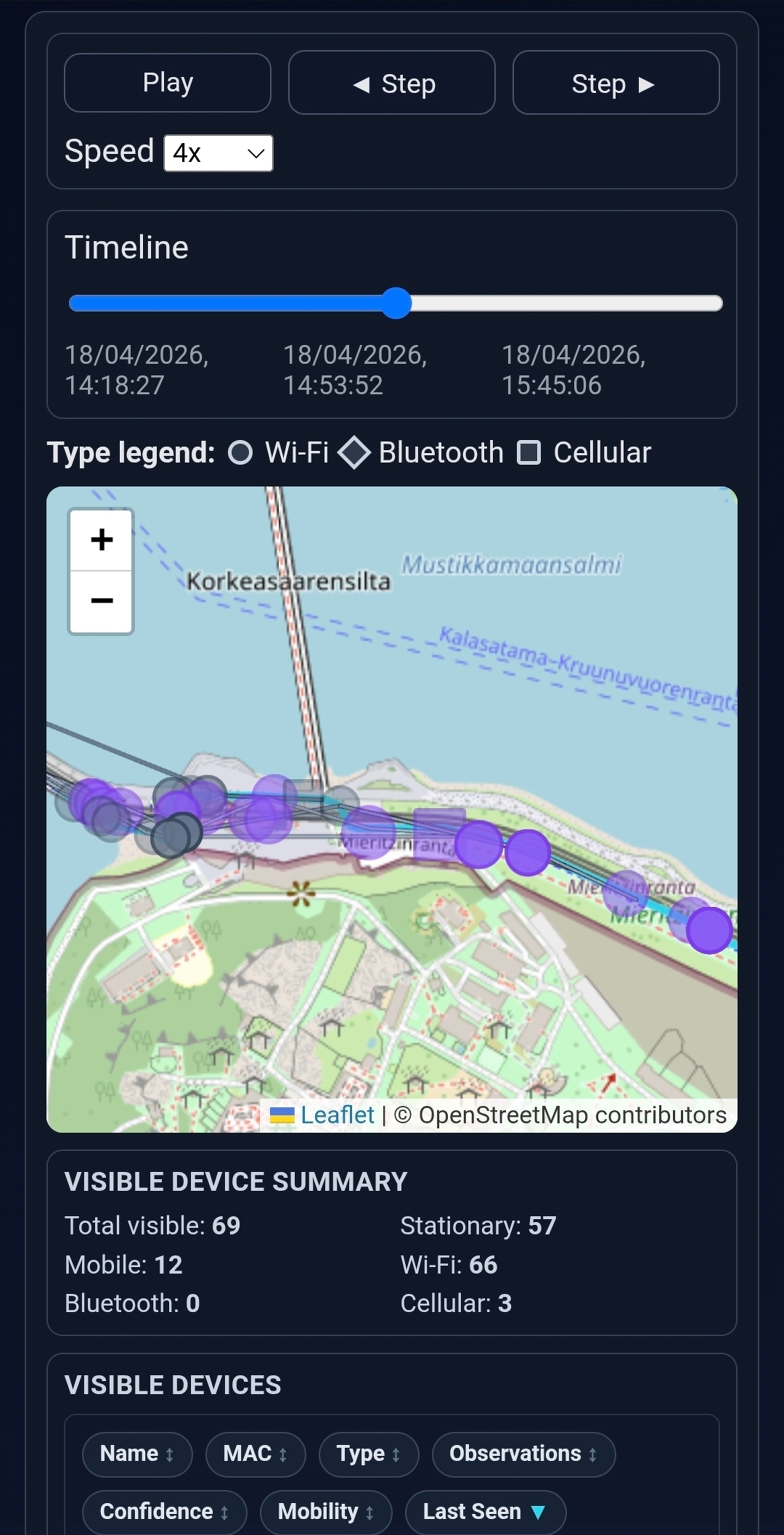
Now, earlier I mentioned I just exported the observations out of the app. That was something of an oversimplification: the app does allow you to export data easily in a very clean CSV format, but the catch is that it’s gzip-compressed, which Android doesn’t handle too well. I tried installing an app from the Play Store for decompressing these files, but the UX of the app was so appalling I ended up uninstalling it and, well, vibe-coding my own gzip decompression app as well. 😅
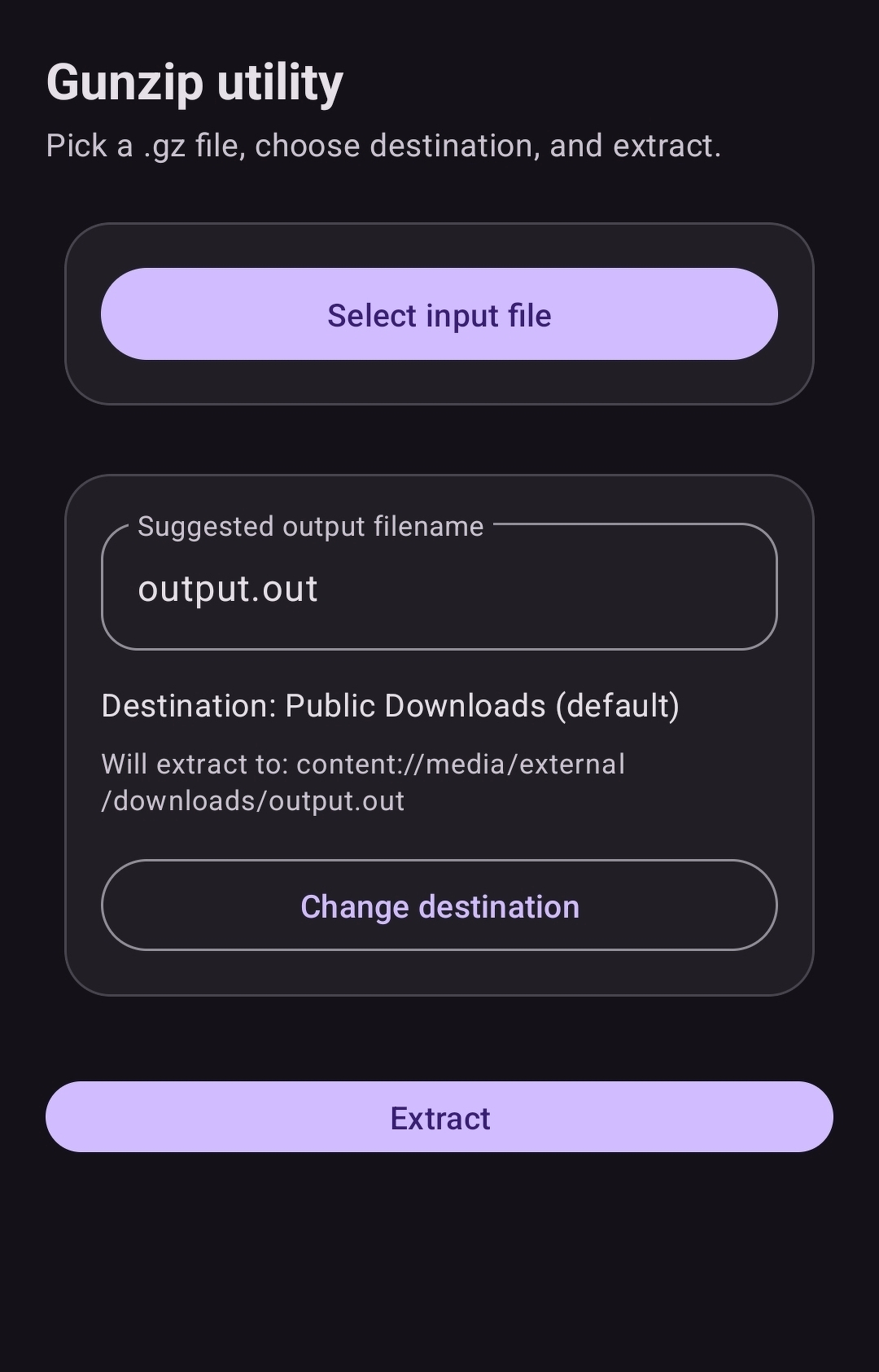
This one I wanted to be a native Android app. A very simple one for one single purpose: it should do its job and get out of the way. Codex delivered here as well, even setting up a GitHub action to immediately compile the project into a usable installation package whenever commits were merged to main. I was able to get the app to be registered in the operating system as one that could handle gzip files, so when WiGLE offered to export the file, I could just open it in my app and extract the CSV file within. I call this one Gunzip for “Un-gzip”. As the name sounds like “gunship”, I iterated a cool icon with Chad for it:

This app’s source code lives here and the app looks like this:
These examples are strong anecdotal evidence that vibe-coding can work in certain contexts extremely well. I don’t recall even looking much into the source of either of those apps. These apps were, however, different from my previous vibing experience regarding the Bluesky bot: the bot originated as an artisan coding project so I felt proper ownership towards it. It was as much about the building experience itself as about the end result, so there I wanted to understand all the code that went into the app, even and especially when created by some agent. With the visualizer and Gunzip both were just tools and a means to an end, which was to see the networks on a map. There, I didn’t care what the code looked like, as long as I got my results and was able to iterate quickly.
The title of this post refers to wardriving, for which there is a good Wikipedia article. Suffice it to say here that the name actually stems from the cult classic hacker movie WarGames!
Finally, what about that person who published their WiFi credentials as a LEGO QR-code? Their network was not in the WiGLE database, so they can rest easy – at least until someone comes close to their house with the app on.